CPU Scheduling Calculator: How to Work Out Waiting, Turnaround, and Response Time by Hand

A CPU scheduling calculator works out how long each process waits, how long it takes to finish, and how quickly it first reaches the processor, based on the arrival time and burst time you feed it and the algorithm you pick (FCFS, SJF, SRTF, Round Robin, or Priority). You don’t need software to run these numbers. A few formulas and a Gantt chart get you the same answer, and once you have seen the process worked out step by step, you can check any calculator’s output or solve the problem cold on an exam.
This guide covers the formulas, walks through all five algorithms you’ll meet in an operating systems course, and carries one worked example through each so you can see exactly where every number comes from.
What you need before you calculate anything
You need three numbers for each process, plus a couple of derived values you’ll calculate yourself.
- Arrival time (AT): when the process enters the ready queue.
- Burst time (BT): how long the process needs the CPU, start to finish.
- Priority (only for priority scheduling) and time quantum (only for Round Robin).
From those, four metrics fall out:
| Metric | Formula | What it tells you |
| Completion Time (CT) | read off the schedule | When the process actually finishes |
| Turnaround Time (TAT) | CT − AT | total time from arrival to finish |
| Waiting Time (WT) | TAT − BT | time spent sitting in the ready queue |
| Response Time (RT) | First CPU access − AT | How long before it starts running at all |
Turnaround time and waiting time get mixed up constantly. Turnaround includes the burst time; waiting time does not. If a process arrives at 0, waits 4 units, then runs for 5, its turnaround is 9, and its waiting time is 4.
The example used throughout
Four processes run through every algorithm below, so you can compare results directly instead of chasing a different data set each time.
| Process | Arrival Time | Burst Time |
| P1 | 0 | 5 |
| P2 | 1 | 3 |
| P3 | 2 | 8 |
| P4 | 3 | 6 |
First-come, first-served (FCFS)
FCFS runs processes in the order they arrive, with no reordering once a process starts. It is the simplest rule there is: whoever gets to the queue first gets the CPU first, and nobody gets interrupted.
Working through the example: P1 arrives at 0 and runs uninterrupted from 0 to 5. P2 arrived at 1 but has to wait until P1 finishes, so it runs from 5 to 8. P3 arrived at 2 and runs from 8 to 16. P4 arrived at 3 and runs last, from 16 to 22.
| Process | Completion | Turnaround | Waiting |
| P1 | 5 | 5 | 0 |
| P2 | 8 | 7 | 4 |
| P3 | 16 | 14 | 6 |
| P4 | 22 | 19 | 13 |
Average waiting time comes out to 5.75, and average turnaround time to 11.25. Notice what happened to P4: it needed only 6 units of CPU time but waited 13 units for a process it arrived after (P3) to clear out first. A short process stuck behind a long one is the main weakness of FCFS, and it gets worse as queues get longer.
Shortest job first (SJF), non-preemptive
SJF picks whichever ready process has the shortest burst time next. Non-preemptive means that once a process starts, it runs to completion even if something shorter shows up in the meantime.
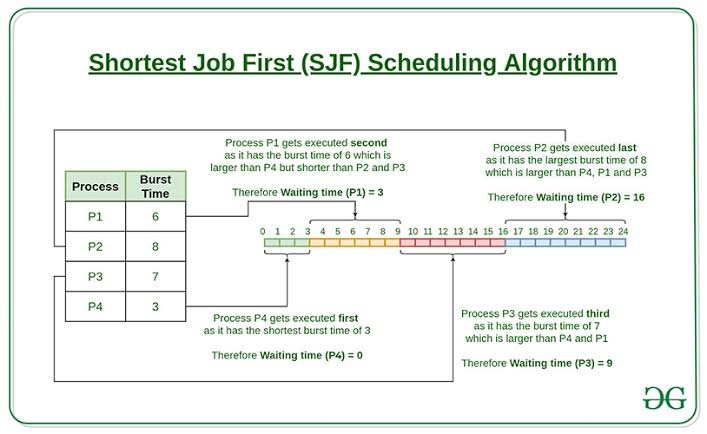
At time 0, P1 is the only process that has arrived, so it has to run even though it isn’t the shortest job overall. It runs from 0 to 5. By then, P2 (3), P3 (8), and P4 (6) have all arrived, so the scheduler picks the shortest of the three: P2, from 5 to 8. Next shortest between P3 and P4 is P4, running from 8 to 14. P3 runs last, from 14 to 22.
| Process | Completion | Turnaround | Waiting |
| P1 | 5 | 5 | 0 |
| P2 | 8 | 7 | 4 |
| P4 | 14 | 11 | 5 |
| P3 | 22 | 20 | 12 |
Average waiting time drops to 5.25, better than FCFS, because short jobs no longer sit behind long ones once they’ve had the chance to be picked. The catch is that a scheduler needs to know burst times in advance, which real systems can only estimate.
Shortest remaining time first (SRTF)
SRTF is the preemptive version of SJF. Instead of waiting for the current process to finish, the scheduler compares remaining time every time a new process arrives, and switches immediately if the newcomer is shorter.
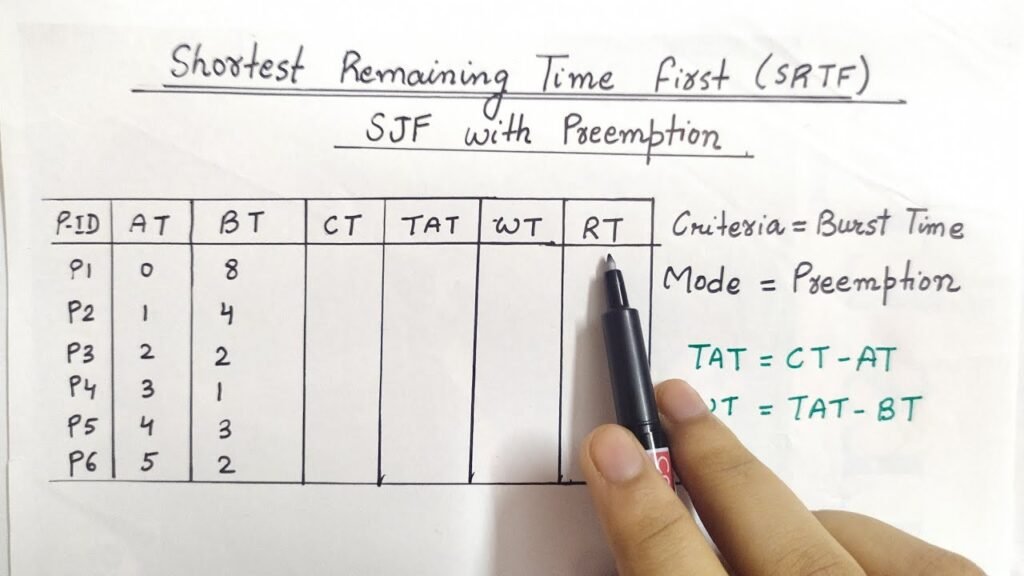
P1 starts at 0 with 5 units left. At time 1, P2 arrives needing only 3, which is less than P1’s remaining 4, so the CPU switches to P2. P2 keeps running (no shorter job shows up) until it finishes at 4. At that point, P1 (4 remaining), P3 (8), and P4 (6) are all waiting, so P1 resumes and runs uninterrupted to 8. P4 is shorter than P3, so it runs next, from 8 to 14, and P3 finishes last, from 14 to 22.
| Process | Completion | Turnaround | Waiting |
| P1 | 8 | 8 | 3 |
| P2 | 4 | 3 | 0 |
| P4 | 14 | 11 | 5 |
| P3 | 22 | 20 | 12 |
Average waiting time falls to 5.0, the best of the three so far, and P2 gets a waiting time of zero because it preempted the moment it arrived. The tradeoff is more context switches, and each switch costs real time that this simplified math doesn’t account for.
Round Robin
Round Robin gives every process a fixed slice of CPU time, the time quantum, and cycles through the ready queue. A process that doesn’t finish within its slice goes to the back of the queue and waits for its turn again.
With a quantum of 4, P1 runs from 0 to 4 (1 unit left), then goes to the back of the queue behind P2, P3, and P4, which all arrived while it ran. P2 needs only 3, so it finishes in one slice, from 4 to 7. P3 runs 7 to 11 (4 left), P4 runs 11 to 15 (2 left), P1 finishes its last unit from 15 to 16, P3 finishes from 16 to 20, and P4 finishes from 20 to 22.
| Process | Completion | Turnaround | Waiting |
| P1 | 16 | 16 | 11 |
| P2 | 7 | 6 | 3 |
| P3 | 20 | 18 | 10 |
| P4 | 22 | 19 | 13 |
The average waiting time here is 9.25, worse than any of the other three in this particular case. That’s the real story with Round Robin: it guarantees every process gets regular turns, which is exactly what makes it good for interactive systems, but it does not minimize waiting time, and a quantum that’s too large just turns it into FCFS with extra steps. A quantum that’s too small does the opposite problem: constant context switching eats CPU time that should be going to actual work.
Priority scheduling
Priority scheduling runs the highest-priority ready process next, using whatever numbering scheme you set (often, a lower number means higher priority). It comes in the same two flavors as SJF: non-preemptive, where a running process finishes before priority is reconsidered, and preemptive, where a higher-priority arrival interrupts whatever is currently running.
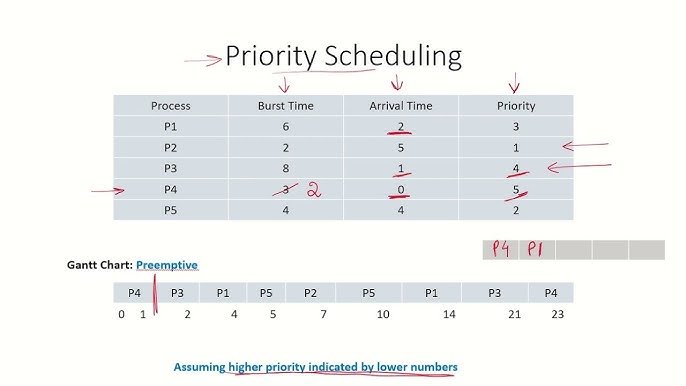
The math is identical to SJF and SRTF, just with priority numbers standing in for burst times when you decide who runs next. The one thing priority scheduling adds is a real risk of starvation: a low-priority process can wait indefinitely if higher-priority work keeps arriving. The usual fix is aging, where a process’s priority improves the longer it waits, guaranteeing it eventually rises to the top of the queue.
Comparing the five algorithms
| Algorithm | Preemptive | Avg. waiting time (example) | Best suited for |
| FCFS | No | 5.75 | Simple batch systems, teaching the basics |
| SJF | No | 5.25 | Batch jobs with known or estimated burst times |
| SRTF | Yes | 5.00 | Mixed job lengths where responsiveness matters |
| Round Robin | Yes | 9.25 (quantum 4) | Interactive, time-sharing systems |
| Priority | Either | Same as SJF/SRTF | Systems where some tasks matter more than others |
The lowest average waiting time in any given data set almost always goes to SRTF, because it has the most information (remaining time, updated continuously) and the most freedom to act on it. That does not make it the best real-world choice. Systems don’t run in isolation, and constant preemption has a cost that these calculations leave out.
What operating systems are actually used today
None of these five algorithms runs unmodified inside a modern kernel. They are the building blocks taught in operating systems courses, and real schedulers borrow ideas from several of them while adding fairness guarantees and hardware awareness that a textbook example doesn’t need.
Linux replaced its long-standing Completely Fair Scheduler with a new algorithm called Earliest Eligible Virtual Deadline First (EEVDF) in kernel version 6.6, released in late 2023. Where the older scheduler tracked how much CPU time each task had already received, EEVDF also tracks a virtual deadline for each task, so a process that just woke up from waiting on input gets picked ahead of one that has been running steadily, without the older scheduler’s pile of manual tuning knobs.
The kernel’s own scheduler documentation covers how eligibility and virtual deadlines are calculated if you want the full mechanics.
Windows takes a different approach, built entirely on priority. Every thread gets a priority level from 0 to 31, and the scheduler always runs the highest-priority ready thread, cycling through threads at the same level in a round robin fashion.
The Windows scheduling priorities documentation lays out how process priority classes and thread priority levels combine, and how the system temporarily boosts a thread’s priority when its window comes to the foreground, which is why clicking into an app usually makes it feel more responsive right away.
Common mistakes when calculating by hand
- Sorting by burst time instead of arrival time for FCFS. FCFS only cares about arrival order. If your process list isn’t already sorted by arrival time, sort it first.
- Letting a process run before it has arrived. In SJF, SRTF, and Round Robin, a process can only be picked once its arrival time has actually passed, even if its burst time would make it the obvious choice.
- Mixing up turnaround time and waiting time. Turnaround includes the burst time; waiting time does not. Double-check by confirming TAT − BT = WT for every process.
- Getting the response time wrong in Round Robin. Response time is the first time a process reaches the CPU, not the total time across all of its slices.
- Forgetting a tie-breaking rule. When two processes have equal burst time or priority, decide upfront whether ties go to whichever arrived first or whichever has the lower process ID, and apply it consistently.
Frequently asked questions
What’s the difference between waiting time and turnaround time?
Turnaround time is the total time from arrival to completion, including the burst time. Waiting time is only the time spent sitting in the ready queue, so it equals turnaround time minus burst time.
Which scheduling algorithm gives the lowest average waiting time?
Shortest Remaining Time First usually produces the lowest average waiting time for a given set of processes, because it always runs whichever ready process has the least work left. It comes at the cost of frequent context switches.
How do you calculate the average waiting time from a Gantt chart?
Read each process’s completion time off the chart, subtract its arrival time to get turnaround time, then subtract its burst time to get waiting time. Add up the waiting times and divide by the number of processes.
What’s a good time quantum for Round Robin?
There’s no fixed number since it depends on typical burst times in your workload. A common rule of thumb is to keep the quantum slightly larger than most burst times, since a quantum that’s too small causes excessive context switching, and one that’s too large behaves like FCFS.
Does Round Robin always give the fairest result?
It always gives every process regular turns, which is a form of fairness, but it does not guarantee the lowest waiting time. A process with a short burst time can still end up waiting several full cycles behind longer ones if the quantum is large.
Conclusion
A CPU scheduling calculator, whether it’s software or a Gantt chart you draw yourself, comes down to four numbers per process: completion time, turnaround time, waiting time, and response time. Work through arrivals in order, apply the rule for whichever algorithm you’re using, and check your formulas (TAT = CT − AT, WT = TAT − BT) at every step. Get those right, and the rest is bookkeeping.
Recommended Articles:
Why Your Motherboard’s BIOS Might Be Limiting Your CPU (And How to Fix It)
Minecraft Server CPU Requirements: What You Actually Need
Plex Says “Not Enough CPU for Conversion of This Item”: How to Fix It
Intel CPU Roadmap Leak: Everything We Know About Nova Lake, Panther Lake, and Beyond
Endpoint Protection Service High CPU: Causes, Fixes, and Ways to Reduce Resource Usage