
A CPU name is not random. It packs four things into one string: the brand tier, the generation, a model number, and a letter or two at the end that tells you the chip’s job. Read it left to right, and a name like Core Ultra 7 265K or Ryzen 7 9800X3D stops looking like a license plate and starts telling you what the chip is for.
This guide breaks down how Intel and AMD name their processors right now, in 2026. By the end, you will be able to look at almost any chip name and identify its tier, how new it is, and which kind of machine it belongs in. That is usually enough to shortlist the right CPU before you check a single benchmark.
What does a CPU name actually tell you?
Every modern CPU name is built from the same building blocks, even though Intel and AMD arrange them a little differently. Once you can spot these four parts, the rest is just learning each brand’s quirks.
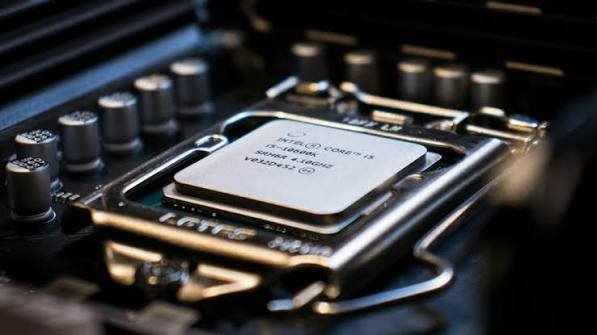
- Brand and tier. The family name (Core, Core Ultra, Ryzen) plus a number like 3, 5, 7, or 9. Higher means more performance and usually more cores. Think good, better, best.
- Generation. How new the design is. A newer generation generally brings better speed and power efficiency, even at the same tier.
- Model number. Two or three digits that separate chips inside the same tier and generation. Higher is faster, but only within that same group.
- Suffix. A letter or two at the end. This is the most useful part for buyers because it tells you the chip’s purpose: high power, low power, gaming, graphics built in, and so on.
Quick rule: compare numbers only within the same brand and the same generation. A bigger number across different generations or brands does not promise a faster chip.
Why CPU names work this way
Names got complicated for a reason. Years ago, chips were sold mainly on clock speed, the gigahertz figure. That broke down because not all gigahertz are equal. A chip from a newer design can do more work per cycle than an older one at the same speed, so a raw speed number tells you less and less about real performance.
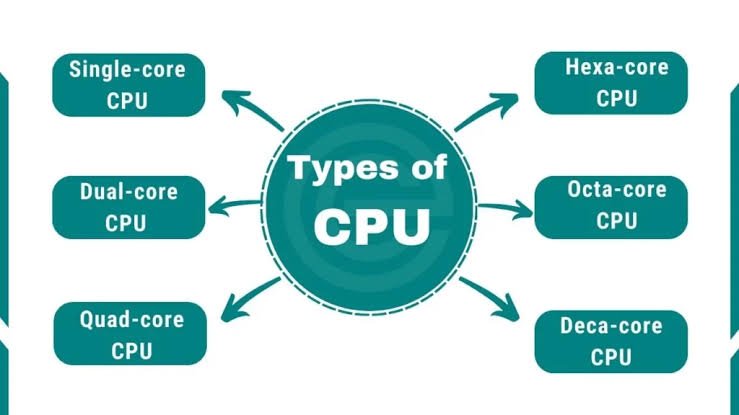
To fix that, both companies moved to tiered names that signal a chip’s class and generation instead of leaning on one number. The trade-off is that you now have to read a few parts instead of one. The upside is that those parts, once you know them, carry far more useful information than a single speed figure ever did. That is why a modern name bundles tier, generation, model, and suffix together.
It also explains why the schemes keep changing. As chips added new features, integrated graphics, efficiency cores, and now AI accelerators, the names had to stretch to flag them. Intel’s 2024 reset and AMD’s multi-digit mobile codes are both attempts to pack more meaning into the same short string.
How to read an Intel CPU name
Intel changed its scheme in a big way, so what you do next depends on whether the name has an “i” in it.
The older style (still everywhere):
names like Core i7-14700K. After more than fifteen years, Intel kept the famous i3, i5, i7, and i9 labels through its 14th generation. You will still see these on shelves and in stock for a long time.
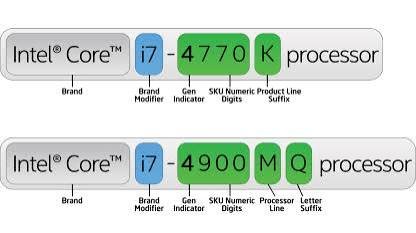
Here is how Core i7-14700K splits up, reading left to right:
- Core i7 is the brand and tier. The 7 sits between the entry i3 and the top i9.
- 14 is the generation. So this is a 14th Gen chip. A 13700K would be 13th Gen.
- 700 is the model number, which ranks the chip inside its tier and generation.
- K is the suffix. Here it means the chip is unlocked, so you can push its clock speed higher (overclock).
The new style (2024 onward):
Intel dropped the “i.” Your next laptop or desktop chip is now a Core 5, Core 7, Core Ultra 7, or similar. The tier numbers stayed, the i is gone, and a series number now does the job the old generation number used to do.
There are now two families. Plain Core chips (Core 3, Core 5, Core 7) are the mainstream option built on slightly older designs. Core Ultra chips (Core Ultra 5, 7, and 9) are the premium line. The big difference under the hood is that Core Ultra chips add a neural processing unit, an NPU, which is a dedicated part for AI tasks, and they often pair it with built-in Intel Arc graphics.
Take Intel Core Ultra 7 265K. It reads like this:
- Core Ultra 7 is the brand and tier.
- 2 is the series, which now stands in for the generation. A 2 means Series 2, the newer wave; a 1 meant the first wave.
- 65 is the model number that ranks it within the family.
- K is the suffix, again meaning unlocked for overclocking.
On laptops, you will see suffixes like H, U, or V instead. On thin-and-light U-series chips, Intel has even used one of the model digits to hint at base power, so a 165U and a 164U can be the same chip at different wattages. For the exact figures on any specific model, Intel keeps a full breakdown on its processor numbers page.
Intel suffixes, decoded
The suffix is the fastest way to tell what a chip is built for. These are the common ones:
| Suffix | What it means |
| K | Unlocked desktop chip you can overclock for extra speed. |
| F | No built-in graphics, so you must add a separate graphics card. |
| KF | Unlocked and needs a separate graphics card. |
| HX / H | High-performance laptop chips, made for gaming and heavy work. |
| U / V | Low-power laptop chips that favor battery life and run cooler. |
| (none) | A standard desktop chip with built-in graphics and locked speed. |
How to read an AMD Ryzen CPU name
AMD’s main consumer line is Ryzen, split into the same kind of tiers: Ryzen 3 for basics, Ryzen 5 for the mainstream sweet spot, Ryzen 7 for the higher end, and Ryzen 9 for top-tier work and gaming. The catch is that AMD reads its model numbers differently on desktops and on laptops. You can confirm any chip’s exact specs on AMD’s processor specifications page.
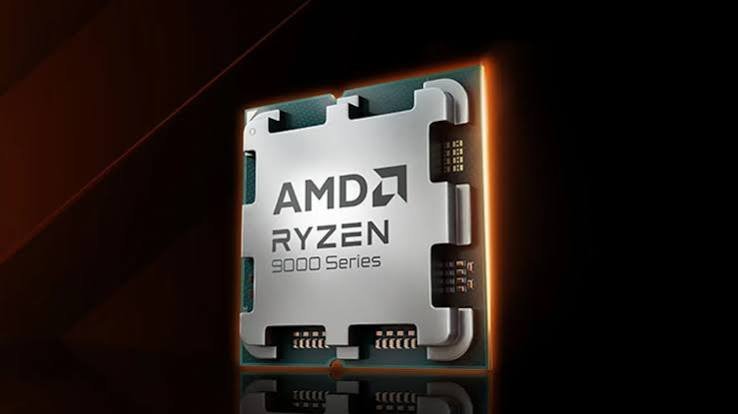
The desktop is the simpler one. Take Ryzen 7 9800X3D:
- Ryzen 7 is the brand and tier.
- 9 is the generation. So this is a 9000-series chip, built on AMD’s Zen 5 design. A 7800X3D would be a 7000-series.
- 800 is the model number, ranking it inside its tier.
- X3D is the suffix. It signals AMD’s 3D V-Cache, an extra cache stacked on the chip that boosts gaming performance.
Laptop is where it gets tricky. AMD gave its mobile chips a four-digit code where each digit means something specific. You almost need a decoder ring, so here it is. Take Ryzen 7 8840U:
- The first digit (8) is the model year. 7 is 2023, 8 is 2024, 9 is 2025, and so on. Note this is the year the chip line launched, not its architecture.
- The second digit (8) is the market segment, which lines up with the tier (Ryzen 5, 7, 9, and so on).
- The third digit (4) is the architecture. A 4 means Zen 4, a 3 means Zen 3, and a 5 means Zen 5.
- The fourth digit (0) separates models on the same architecture, where a higher digit is the stronger version.
- Suffix (U) is the form factor and power, just like on a desktop.
Watch out: because the first laptop digit is the launch year and not the architecture, a higher number can hide an older design. Always check the third digit to see which Zen generation you are really getting.
AMD suffixes, decoded
AMD’s suffixes tell you about power, graphics, and special features. The ones you will run into most:
| Suffix | What it means |
| X | Higher clock speeds and better overclocking. The go-to for desktop gaming. |
| X3D | Adds stacked 3D V-Cache for a real boost in many games. |
| G | Has strong built-in graphics, so no separate graphics card needed. |
| F | No built-in graphics; pair it with a graphics card. |
| HX / HS | High-performance laptop chips for gaming and creator work. |
| U | Low-power laptop chips tuned for thin machines and battery life. |
AMD also runs a separate Ryzen AI line for laptops, like the Ryzen AI 9 HX 370, which leads with an NPU for on-device AI. And the PRO label you sometimes see (Ryzen 7 PRO) just adds business security and management features; the numbers still read the same way.
Reading the model number: why bigger is not always better
The single most common mistake is treating a bigger number as a faster chip, no matter what. It only works inside one fence: same brand, same generation, same tier line.
A Ryzen 5 9600X is newer and faster than a Ryzen 5 7600X because 9000 beats 7000 in the same family. But a Core i5 from a new generation can match or beat an older i7, because the generation jump can outweigh the tier gap. Across brands, the numbers do not line up at all. An Intel Core 7 and a Ryzen 7 share a number and a rough market position, nothing more.
Laptops have their own trap. An AMD mobile chip with a higher first digit was simply launched in a later year, which does not guarantee a newer design inside. A Ryzen 7 7735U and a Ryzen 7 6800U use very close architecture despite the year-apart names. This is exactly why the third digit, the one that names the Zen generation, is worth checking before you decide.
So the model number is a tiebreaker, not a verdict. Use the tier and generation to get into the right neighborhood, then let the model number sort chips that are otherwise close.
What the name does not tell you (and where to look)
A name is a great shortlist tool, but it leaves out a few things that matter once you are choosing between two close chips. Knowing the gaps saves you from surprises.
Core counts and core types.
The name hints at performance but rarely spells out how many cores you get. Modern Intel chips, from the 12th generation onward, also mix two kinds of cores: performance cores (P-cores) that handle heavy work, and efficient cores (E-cores) that take on background tasks while sipping power. Two chips with similar names can split those cores differently, which changes how they feel in real use.
Actual clock speeds.
The name gives you a rough ranking, not the real base and boost speeds. Those vary by model and even by laptop, because a thin machine may run the same chip more slowly to stay cool.
Whether designs were reused.
Both brands sometimes refresh an older design and sell it under a newer-looking name, especially in laptops. AMD’s mobile architecture digit is your tell here, and the safest move is a quick spec check before you buy.
For any of these, the fix is the same: read the name to build your shortlist, then open the maker’s spec page for the two or three chips you are deciding between. That last step takes a minute and settles most close calls.
How to use a CPU name when you are actually buying
Here is the quick mental checklist to run on any chip name before you buy:

- Read the tier first. 3 and 5 cover everyday use and light gaming. 7 and 9 are for serious gaming, video editing, and heavy multitasking. Most people are well served by a 5 or 7.
- Check the generation. Newer almost always means better speed and battery life. On AMD laptops, remember the architecture digit, the third one, matters more than the year digit.
- Read the suffix for fit. Want a desktop you can tune? Look for K (Intel) or X (AMD). Building without a graphics card? Avoid F and look for G on AMD. Buying a laptop? H and HX mean power, U means battery life.
- Then, and only then, compare numbers. Once two chips share a brand, generation, and tier, the higher model number is the faster one.
That is the whole skill. The name gets you most of the way to the right shortlist, and a couple of benchmark checks finish the job.
Frequently asked questions
What happened to Intel’s i3, i5, and i7 names?
Intel dropped the “i” starting in 2024. The tier numbers stayed, so an old Core i5 is now a Core 5 or Core Ultra 5. The older i-name chips are still sold and supported, so both styles overlap on shelves for now.
What is the difference between Intel Core and Core Ultra?
Core Ultra is the premium line. Its main edge is a built-in NPU for AI tasks, often paired with Intel Arc graphics and a newer design. Plain Core chips are the mainstream option, usually on slightly older architecture.
Does a highe;r CPU number always mean a faster chip?
Only within the same brand, generation, and tier. A bigger number across different generations or between Intel and AMD does not promise more speed. Use tier and generation first, then the model number as a tiebreaker.
What does X3D mean on an AMD chip?
X3D marks AMD’s 3D V-Cache, an extra cache stacked on the processor. It gives a real boost in many games, which is why chips like the Ryzen 7 9800X3D are popular gaming picks.
Which CPU tier should most people buy?
A Ryzen 5 or 7, or an Intel Core 5 or 7, hits the sweet spot for most users. They handle everyday work, multitasking, and gaming well without paying for top-tier power you may never use.
Conclusion
A CPU name is a short code for tier, generation, model number, and purpose. Read it left to right: the tier tells you the class, the generation tells you how new it is, the model number ranks chips within that group, and the suffix tells you what machine it belongs in. Match the suffix to how you will actually use the computer, compare numbers only within the same brand and generation, and you will pick the right chip with confidence
Recommended Article:
The Best CPUs to Overclock on the MSI MAG Z890 Tomahawk WiFi (and How to Do It)
How to See If XMP Is Enabled in CPU-Z (Step-by-Step)
Ntoskrnl.exe High CPU: What It Is and How to Fix It
What Is a Super Simple CPU Instruction Set? A Plain-English Guide