
A Minecraft server needs a CPU with strong single-core speed above almost everything else. For a small survival world with two to ten players, a modern processor running at 3.5 GHz or faster on a single core will run smoothly. Larger public servers, heavy redstone builds, or big modpacks need more headroom, but the rule stays the same: clock speed and per-core performance matter far more than the number of cores you have.
Why single-core speed matters more than core count
Minecraft’s server software runs its main game loop, called the tick, on one thread. Every tick, the server has to update every block, entity, redstone circuit, and player action in the world, twenty times a second. That work cannot be split across multiple cores the way a video render or a spreadsheet calculation can.
This is why a four-core chip running at 5 GHz will beat a sixteen-core chip running at 2.5 GHz for Minecraft, even though the sixteen-core chip looks stronger on paper. The main thread is the bottleneck, and it only cares about how fast one core can chew through instructions.

A few background tasks do use extra cores: chunk generation when a player explores new terrain, network I/O, and some plugin or mod tasks that developers have deliberately moved off the main thread. But the core simulation, the part that decides whether your server feels smooth or laggy, stays on a single thread no matter how many cores you throw at it.
Minimum CPU to run a Minecraft server
For a small, private server with a handful of friends, you don’t need much. A CPU with a single core running at around 2.5 GHz to 3 GHz, paired with at least 4 GB of RAM, will run a vanilla world without much trouble. This covers most home setups, low-cost cloud instances, and budget hosting plans built for two to five players.
Once you cross about ten players, or add a few plugins, that minimum starts to show its limits. Chunk loading takes longer, redstone farms tick more slowly, and you’ll start to see occasional slowdowns during busy moments like a big build project or a group boss fight. A processor in the 3.2 to 3.8 GHz range gives you real breathing room without paying for hardware you don’t need.
CPU requirements by server size
Player count is the biggest single factor in how much CPU power you need, followed by how active those players actually are. A group that is mostly building in one area is much lighter than the same group spread across a huge, explored map with farms and redstone running constantly.
| Server size | Recommended CPU | Notes |
| 1 to 10 players | 3.0 GHz+ single-core performance, 2 to 4 cores | Handles vanilla or lightly modded survival easily |
| 10 to 25 players | 3.5 GHz+ single-core performance, 4 cores | Needs headroom for more entities and chunk activity |
| 25 to 50 players | 4.0 GHz+ single-core performance, 6 cores | Benefits from server optimization software like Paper |
| 50+ players | High-clock modern CPU (Ryzen 7000/9000 class or newer), 8+ cores | Usually needs dedicated hardware and active tick tuning |
These numbers assume a fairly standard render distance, around 8 to 10 chunks, and a world without extreme amounts of redstone or mob farms. A heavily built-up world with dozens of active farms can push CPU load well past what player count alone would suggest, sometimes doubling the requirement.
A server that feels fine with five players exploring calmly can still choke with five players running four automatic farms and a mob grinder at once. Player count is a starting point, not the whole picture.
How many cores does a Minecraft server actually use
Since version 1.14, the vanilla server has been able to spread some work, like chunk generation and certain background tasks, across a few extra cores. In practice, it rarely uses more than three or four cores at once, and the bulk of the work still lands on a single core doing the main tick loop.
Hyperthreading, the feature that lets one physical core present itself as two logical cores, doesn’t help much here either. It won’t hurt your server, but don’t expect a real performance jump from it. If you’re choosing between a CPU with fewer, faster cores and one with many slower cores, pick the faster one.
Server software like Paper and Purpur adds some smarter scheduling and async chunk loading, which uses extra cores a bit more effectively than vanilla. This helps, but it doesn’t change the fundamental limit: the world simulation itself is still single-threaded.
CPU needs for modded and plugin-heavy servers
Mods and plugins add extra logic that has to run somewhere, and a lot of it runs on the main thread right alongside the core game loop. A modpack full of automation, extra dimensions, or complex machinery can push CPU demand well above a vanilla server with the same number of players.
For light plugin use, like an economy plugin, a basic anti-grief tool, and a few quality-of-life additions, a 3.5 GHz CPU handles things fine for a small to mid-size community. For a heavy modpack, aim for 4.0 GHz or higher on a modern CPU, since these packs load hundreds of extra block and entity types that all need processing every tick.
Plugin quality matters as much as quantity. A handful of poorly optimized plugins can hurt performance more than a large number of well-written ones. If your server starts lagging after adding new plugins, check each one’s CPU impact individually before assuming you need better hardware.
Best CPUs for self-hosting a Minecraft server
If you’re setting up your own machine rather than renting hosting, look for a recent desktop CPU with strong single-core boost clocks rather than a server-grade chip built for many parallel tasks. AMD’s Ryzen 7000 and 9000 series desktop processors are a strong fit, since several models in the lineup can boost well past 5 GHz on a single core, which is exactly what the main tick thread benefits from. You can check current model specs on AMD’s Ryzen product page.
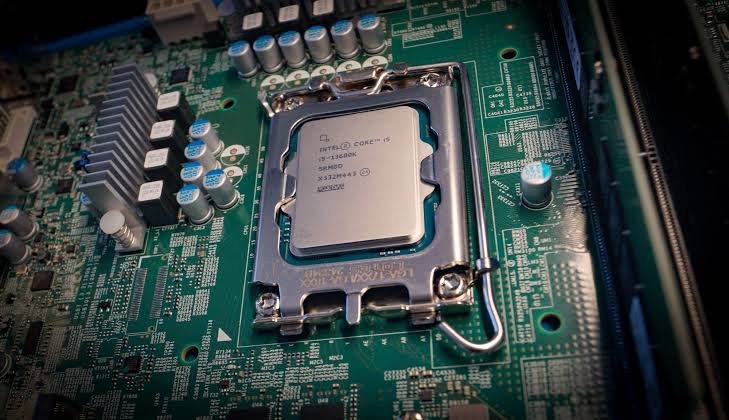
Recent Intel Core i5 and i7 desktop chips work well too, as long as you check the boost clock rather than just the base clock, since Minecraft’s main thread will run at whatever speed the CPU can sustain on a single active core. Avoid older server processors that trade clock speed for a large core count. They look impressive in a spec sheet, but often underperform a cheaper, newer gaming CPU for this specific workload.
If you’re renting hosting instead of buying hardware, ask the provider what CPU model backs your plan and what the per-core clock speed is, not just how many virtual cores you’re allotted. A host advertising eight vCPUs on an older, lower-clock chip can perform worse than a plan with fewer cores on newer, faster hardware.
Java Edition vs Bedrock Edition CPU needs
Java Edition and Bedrock Edition run on different server software, but the CPU story is similar for both: the main simulation loop is single-threaded, so clock speed drives performance more than core count. You can find current version requirements, including the Java runtime version each release needs, in the server requirements section of the Minecraft Wiki.
Bedrock’s dedicated server tends to be a bit lighter on resources at similar player counts, partly because it’s written in C++ rather than Java, which removes some of the overhead that comes with Java’s garbage collection pauses. That said, the difference mostly shows up in memory behavior rather than raw CPU ceiling. Both editions hit the same wall eventually: a single core can only process so many ticks per second, no matter which language the server is written in.
If you’re running a combined setup with a proxy like Velocity or BungeeCord in front of multiple Java servers, budget extra CPU for the proxy itself. It’s lightweight compared to a full game server, but it still needs its own share of a core to handle player routing and packet forwarding without adding delay.
Signs your CPU is the bottleneck
The clearest sign is a drop in ticks per second, or TPS, which should sit at 20 under normal conditions. If TPS drops into the teens or lower during normal play, without huge player spikes, your CPU is likely struggling to keep up with the world simulation. Most server software prints TPS in the console or through a /tps command if you’re running Paper or a similar fork.
Before assuming you need new hardware, rule out the easy fixes first. Lower your render and simulation distance, remove or optimize heavy redstone farms, switch to Paper or Purpur if you’re still on vanilla, and check for a single poorly written plugin causing the slowdown. Only after those steps still leave you short should you look at a CPU upgrade.
Frequently asked questions
Does a Minecraft server need a good GPU?
No. A Minecraft server doesn’t render graphics, so a graphics card adds nothing to server performance. Put your budget into CPU clock speed and RAM instead.
How many CPU cores do I actually need?
Two to four cores cover most servers, since the main simulation only uses one core, and background tasks rarely use more than two or three at once. More cores only help with running multiple servers or heavy async plugin work.
Can a Raspberry Pi run a Minecraft server?
A Raspberry Pi 4 or 5 can run a very small vanilla server with one or two players, but its low clock speed and limited single-core performance make it unsuitable for anything larger or modded.
Does overclocking help Minecraft server performance?
Yes, a stable overclock that raises single-core boost clocks can measurably improve tick times, since the main thread is clock-speed bound. Stability matters more than raw speed, since crashes are far worse than a slightly slower server.
Why does my server lag with only a few players online?
Lag with few players usually points to redstone farms, mob grinders, or poorly optimized plugins overloading a single core, rather than the player count itself. Check your TPS and console warnings to confirm before upgrading hardware.
Conclusion
A Minecraft server lives or dies on single-core CPU speed, not core count. A small friend group needs a modern 3 GHz-class chip, a public server with dozens of players needs 4 GHz or better on a recent processor, and heavy modpacks push that number higher still.
Recommended Articles:
Endpoint Protection Service High CPU: Causes, Fixes, and Ways to Reduce Resource Usage
Plex Says “Not Enough CPU for Conversion of This Item”: How to Fix It
AMD Zen 6 CPU Leak Details: Everything We Know So Far About AMD’s Next-Generation Ryzen Processors
How Much Gold in CPU Processors? Everything You Need to Know
How to Read a CPU Name: Intel and AMD Naming Schemes Made Simple