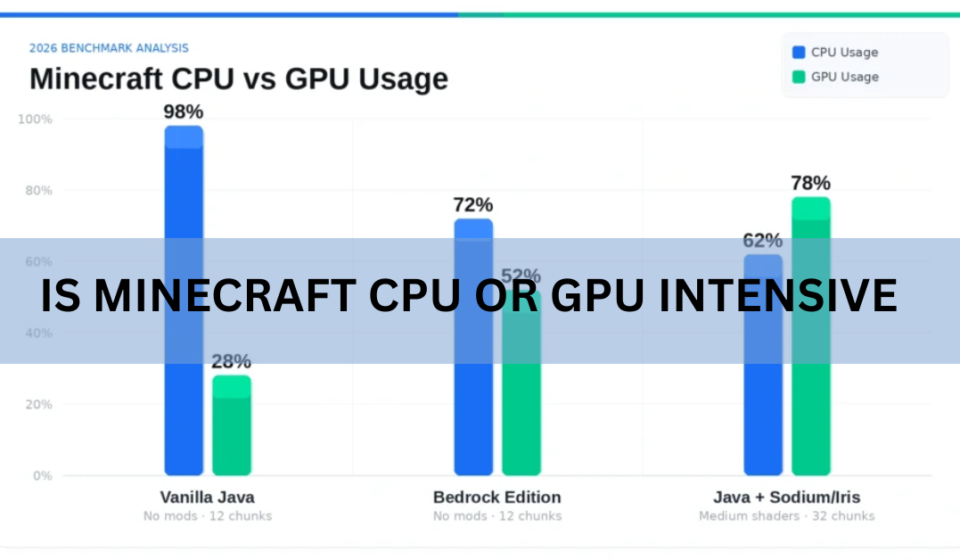

Minecraft is mostly CPU intensive. Your processor does the heavy lifting: building the world as you move, running mob behavior, handling redstone, and keeping the game clock ticking. The graphics card only becomes the bottleneck once you add shaders, high resolutions, or big render distances. So if your frame rate is low, a faster CPU usually helps more than a fancy GPU.
That answer surprises people, because almost every other modern game leans hard on the graphics card. Minecraft is the odd one out. Below is how the game splits work between the two parts, when each one starts to matter, and what to actually change when things run badly.
Why the CPU carries most of the load
The CPU is the brain of the game. In Minecraft it runs almost everything you can’t see rendered on screen. When you walk into new territory, the game has to invent that terrain on the spot, place every block, and decide where caves, ores, and trees go. That is pure processor work.
A few tasks lean on the CPU the hardest:
- World generation: creating and loading new chunks of land in real time as you explore or fly.
- The tick loop: the game updates the world 20 times a second (each update is called a tick), touching every active block and creature.
- Mob and villager AI: pathfinding, breeding, villager schedules, and combat all run on the processor.
- Redstone: large contraptions recalculate constantly, and complex builds can eat a huge share of processor time.
Here is the part that explains everything else. Minecraft Java Edition runs most of this simulation on a single processor core. The engine is old, and its main loop was never split cleanly across many cores. You can own a 16-core chip and Minecraft will still lean on one or two of them for the game logic. That is why a processor’s single-core speed matters far more than its core count.
Rule of thumb: for Minecraft, one fast core beats eight slow ones. Chase high clock speed and strong per-core performance, not a big core count.
This single-core reality is also why some players see low overall CPU usage and low GPU usage at the same time and get confused. Task Manager might show the processor at 30 percent, but one core is pinned at 100 percent and holding the whole game back. The other cores sit idle because the game can’t hand them the work.
When the GPU actually matters
The graphics card handles what you see: drawing blocks, textures, lighting, and visual effects. In plain vanilla Minecraft at normal settings, that job is light. Most graphics cards from the last decade can push hundreds of frames per second without breaking a sweat, which is exactly why the CPU ends up being the limit.
The GPU steps into the spotlight when you make the picture more demanding. These settings move work onto the graphics card:
- Shaders, which add realistic lighting, shadows, and water reflections.
- High-resolution texture and resource packs (128x, 256x, or higher).
- Fancy graphics, smooth lighting, and other quality options turned up.
- Playing at 1440p or 4K instead of 1080p.
Run a heavy shader pack at 4K and the picture flips completely. Now the GPU is the part sweating, and the processor gets a breather. This is the single most useful thing to understand: Minecraft can be CPU bound or GPU bound depending on how you play. A survival world with a big render distance and lots of farms is a CPU test. That same world with a demanding shader pack becomes a graphics test too.
Java vs Bedrock: they don’t behave the same
The two versions of Minecraft use your hardware differently, and it’s worth knowing which one you run.
Java Edition
Java Edition is the classic PC version, and it’s the more CPU-hungry of the two. Its world simulation still leans on that single main thread, so single-core speed rules. The upside is modding, which is where Java shines. The downside is that a weak processor shows up fast, especially with a high render distance.
Bedrock Edition
Bedrock is the version that ships on consoles, phones, and Windows through the Microsoft Store. It’s written in C++ and better optimized across platforms, so it spreads work more evenly and generally makes fuller use of the graphics card. On the same machine, Bedrock often runs smoother out of the box. If raw performance is your only goal and you don’t care about mods, Bedrock is the easier ride.
| What you care about | Java Edition | Bedrock Edition |
| Main hardware demand | CPU single-core speed | More balanced CPU and GPU |
| Out-of-box performance | Depends heavily on the CPU | Generally smoother |
| Modding | Huge, mature mod scene | Limited by comparison |
| Best for | Modders and PC purists | Cross-platform and easy FPS |
How to tell which part is holding you back
Before you spend money or change settings, find out what’s actually limiting you. It takes two minutes.
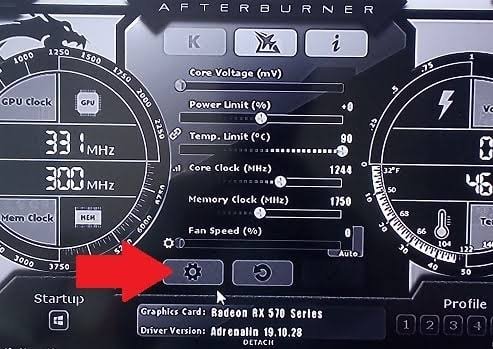
- Open a performance monitor. Windows Task Manager works, or use MSI Afterburner for a live overlay while you play.
- Load into your world and play normally. Walk into new areas, since that’s when the game works hardest.
- Watch both numbers. If GPU usage sits near 95 to 100 percent, you’re GPU bound. If GPU usage is low but one CPU core is maxed out, you’re CPU bound.
- Check per-core CPU, not just the total. A low overall figure can hide one fully loaded core, which is the classic Minecraft pattern.
If both the processor and the graphics card look lightly used yet the game still stutters, the cause is usually somewhere else: not enough memory given to the game, a slow hard drive stalling chunk loads, or a background program stealing resources.
Fixes that actually raise your frame rate
Once you know the culprit, the fixes are straightforward. Start at the top; the early ones give the biggest gains for the least effort.
Lower your render distance
This is the single most effective free fix, and it targets the processor directly. Render distance controls how many chunks the game keeps loaded around you, and every chunk is work. Dropping from 32 chunks to 12 or 16 can lift your frame rate immediately, especially on older machines. If you’re CPU bound, do this first.
Turn down simulation distance
Simulation distance is separate from render distance. It sets how far out the game keeps mobs, redstone, and crops actively ticking. Lowering it to 5 or 6 chunks cuts a big slice of processor work, particularly in worlds packed with animals or farms. You’ll still see the far terrain; it just won’t be busy simulating.
Give the game the right amount of memory
Allocate around 4 GB of RAM in the launcher for a modern version. More is not automatically better. Over-allocating can cause stutters when Java pauses to clean up memory, so don’t dump 16 GB in and expect magic.
Install free optimization mods (Java only)
This is the big one for Java players. A small set of free mods rewrites the game’s rendering and logic to run far faster, without changing how the game looks or plays.
- Sodium rebuilds the renderer and can multiply your frame rate, sometimes two to five times.
- Lithium optimizes the game’s physics and logic, easing processor load.
- Iris adds shader support that runs far better than the old method, if you want the pretty lighting.
You install these through the Fabric mod loader. If you’d rather not manage files by hand, the Modrinth app downloads and updates them for you. These mods are the reason many players keep a smooth 60 FPS on hardware that struggles with vanilla.
Match graphics settings to your bottleneck
If you’re GPU bound, turn down the visual settings: switch Fancy to Fast, lower smooth lighting, and ease off shader quality or high-resolution packs. If you’re CPU bound, those graphics tweaks barely help, and you should focus on render and simulation distance instead.
So which part should you actually buy or upgrade?
For vanilla and lightly modded Minecraft, put your money into the CPU. A processor with high clock speed and strong single-core performance will do more for your frame rate than a pricey graphics card. Modern AMD Ryzen and Intel chips with fast per-core speed are the sweet spot, and AMD’s X3D parts with extra cache are especially strong for this game.
You do not need a top-tier graphics card for normal play. Even integrated graphics or a modest card will run vanilla Minecraft at 1080p perfectly well. Save the GPU budget for when you genuinely want shaders or 4K, and buy the graphics card to match that goal specifically.
For heavy modpacks the rules bend. Large packs add masses of new entities, blocks, and logic, which piles even more onto the processor, and some can double or triple resource use. A modpack can also demand a stronger graphics card if it bundles fancy visuals. When in doubt, a strong CPU is still the safer bet for Minecraft. You can check the current baseline on Mojang’s official Java Edition system requirements page, which as of July 21, 2026 targets 1080p at 60 FPS on the Fancy preset with 16 GB of RAM.
Frequently asked questions
Does Minecraft need a good graphics card?
Not for normal play. Vanilla Minecraft runs fine at 1080p on integrated graphics or a modest card. You only need a strong GPU if you plan to run shaders, high-resolution texture packs, or play at 1440p or 4K.
Why is my Minecraft laggy even with a good PC?
Usually a single-core CPU limit, since Java Edition runs its world simulation on one main thread. High render distance, lots of entities, or complex redstone can max that one core out. Lower render and simulation distance to test it.
Is Minecraft CPU or GPU intensive with shaders?
With shaders it becomes GPU intensive as well. Shaders push heavy lighting and reflection work onto the graphics card, so you’ll want a capable GPU on top of a solid CPU. Without shaders, the CPU stays the main limit.
Do more CPU cores help Minecraft?
Not much for Java Edition, because the core game logic runs mostly on one thread. A chip with high single-core speed beats one with lots of slower cores. Extra cores help background tasks and some optimization mods, but not the main simulation.
What’s the single best way to boost Minecraft FPS?
Lowering render distance is the fastest free fix. On Java Edition, installing Sodium gives the biggest jump, often several times your starting frame rate, without changing how the game looks.
Conclusion
Minecraft is mainly a CPU game. One fast processor core does the real work of building and running your world, while the graphics card only takes over when you add shaders, high resolutions, or big render distances. Check whether your CPU or GPU is maxed out, lower render and simulation distance first, and on Java add Sodium and friends. A good result is a steady 60 FPS, and for most players a strong single-core CPU is the surest way to get there.
Recommended Article
svchost.exe High CPU: How to Find the Real Cause and Fix It
Windows Problem Reporting High CPU: How to Fix It Fast
Intel System Usage Report High CPU: What It Is and How to Stop It
IIS Worker Process High CPU: How to Find the Cause and Fix It
Max CPU Boost Clock Override: What It Does and When It Helps